


October 1, 2026
|
5 min read


Published: September 22, 2026

Blazingly fast way to build, track and deploy your models!
Over the last few years, generative AI has moved from research labs into the center of business and everyday applications. Large Language Models (LLMs) like GPT-4, Claude, and LLaMA have demonstrated remarkable capabilities—summarizing documents, generating software code, creating images, and even acting as conversational assistants. But with this rapid adoption comes a new challenge: how do enterprises manage, govern, and scale generative AI usage across multiple providers and teams, while ensuring security, compliance, and cost efficiency?
The answer lies in a concept that is quickly gaining momentum: the Generative AI Gateway.
A Generative AI Gateway is a middleware layer that sits between applications and generative AI services. Much like an API gateway routes and secures calls to backend services, a generative AI gateway is designed specifically for the unique needs of AI models. It centralizes governance, controls access, enforces security, and optimizes the use of AI models.
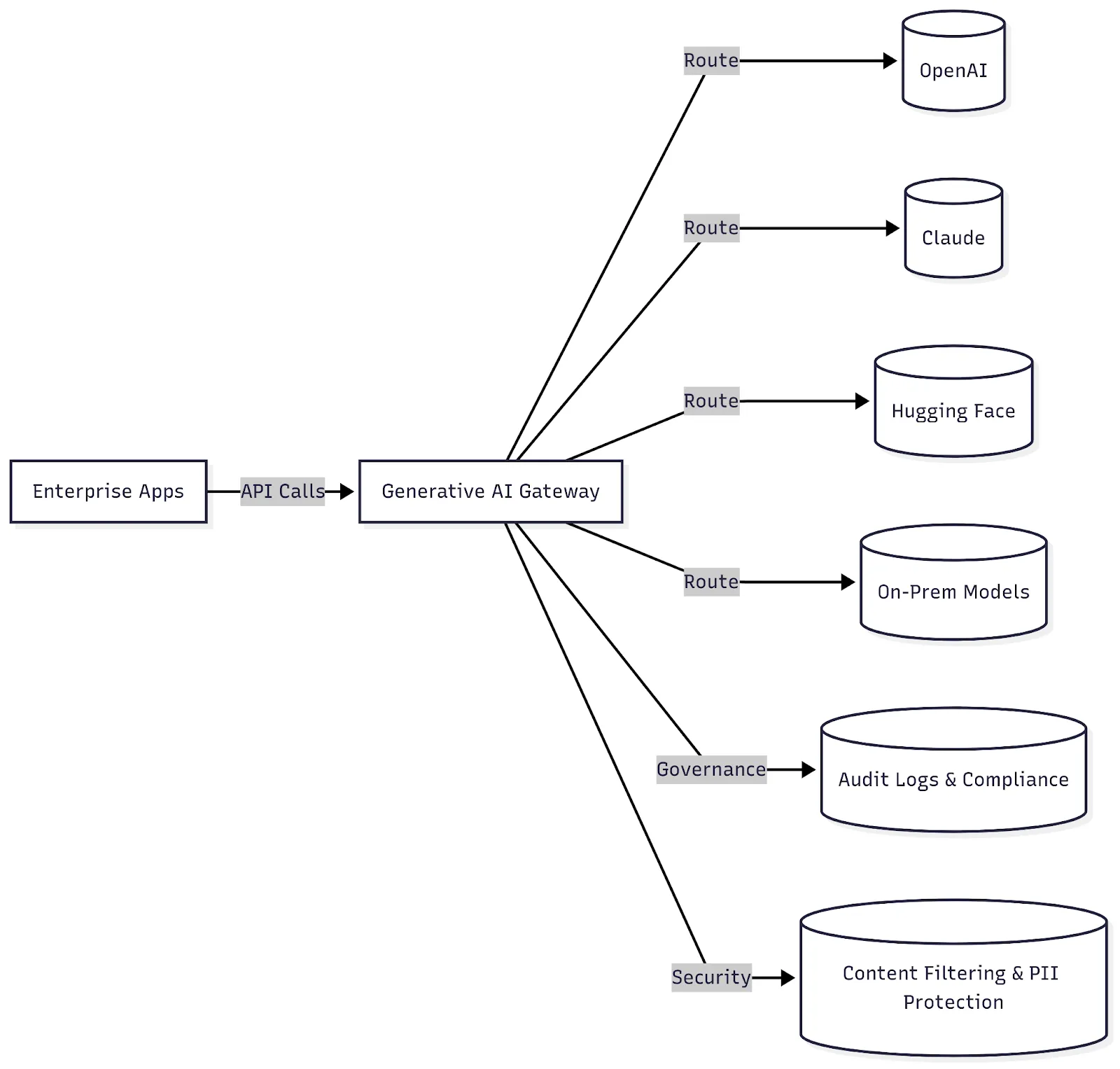
In simpler terms, it acts as a control tower for all AI traffic—deciding which model to call, how much usage to allow, how to handle risky responses, and how to log activities for compliance.
Whereas a traditional API gateway manages HTTP traffic, a generative AI gateway understands:
A generative AI gateway comes into play every time your application needs an AI model. Instead of sending a request directly to a provider, the request passes through the gateway, where it is checked, processed, and routed before the final response comes back.
Here’s what that journey looks like:
It starts with a prompt. Your application sends the user's request to the generative AI gateway instead of connecting directly to an AI provider.
Before the request goes any further, the gateway verifies who or what is making the request. This helps prevent unauthorized applications or users from accessing AI infrastructure.
The gateway then determines where the request should go. Depending on your setup, it can send it to a specific model or choose between different providers based on factors such as availability, cost, or the type of request.
The request can then pass through the policies you've defined for your AI applications. These checks can identify sensitive data, unsafe requests, or other content that shouldn't reach the model. Similar checks can also be applied to the model's response.
As the request moves through the system, the gateway captures relevant usage information, such as tokens, requests, latency, and model usage. This gives you a clearer picture of where your AI resources are being consumed.
Once the request has been processed and the response has passed the required checks, the gateway sends it back to your application. The user sees the final response without needing to know which model or provider handled the request behind the scenes.
To understand the role of a generative AI gateway, imagine an international airport. Every day, thousands of planes (AI requests) arrive from multiple airlines (AI providers), each carrying passengers (data) destined for the same country (enterprise applications). Before passengers can enter the country, they must pass through immigration and security checks. This is where the system ensures order, safety, and compliance.
Here’s how this analogy maps:
But let’s extend the analogy further for clarity:
In essence, the generative AI gateway is like the airport’s security, customs, and immigration combined into one streamlined checkpoint. It ensures that regardless of the airline (AI provider) or the passenger (data), the entry into the enterprise ecosystem is safe, regulated, and optimized. Without such a system, the airport (enterprise AI adoption) would descend into chaos, with unchecked entries, security threats, and overwhelming traffic.
The demand for AI governance isn’t theoretical—it’s essential. Enterprises are under immense pressure to adopt AI responsibly. Without a gateway, generative AI adoption can spiral into chaos: uncontrolled costs, security breaches, regulatory violations, and inconsistent experiences.
.webp)
.webp)
If you're running a business and thinking about using AI tools like ChatGPT or Claude, you've probably realized it can get pretty messy pretty fast. That's where something called a generative AI gateway comes in handy. Think of it as a smart middleman that makes everything easier and safer.
Instead of having your developers learn how to connect to OpenAI, then Anthropic, then whatever new AI company pops up next week, they just connect to one place - the gateway. It's like having one remote control for all your TVs instead of juggling five different ones. This saves time and headaches, especially when new AI models come out every few months.
Not every task needs the most expensive, powerful AI model. Sometimes you need super accurate results for important legal work, other times you just need quick answers for customer service. With a gateway, you can easily switch between different AI models without changing your code. It's like being able to choose between a sports car and a pickup truck depending on what you need to haul.
AI services go down sometimes - it happens to everyone. A good gateway automatically switches to a backup when your main AI service is having problems. Your customers won't even notice the difference. It's like having a backup generator that kicks in during a power outage.
One big problem with AI is that it's hard to track who's using what and how much it's costing you. Gateways give you clear dashboards showing exactly how much each team is spending and what they're doing with AI. No more surprise bills at the end of the month.
AI can sometimes say weird or inappropriate things, or accidentally leak private information. A gateway acts like a filter, catching problematic responses before they reach your customers. It's like having a supervisor double-check everything before it goes out the door.
AI can get expensive fast if you're not careful. Gateways let you set spending limits for different teams or projects, so no one accidentally burns through your entire budget in a weekend. They also help reduce costs by avoiding duplicate requests and caching common responses.
If you're in healthcare, finance, or any regulated industry, you have strict rules about data privacy and security. Gateways help you follow these rules by managing access keys securely and keeping detailed logs of everything that happens. This makes audits much easier.
Instead of spending time figuring out API keys and rate limits, your developers can focus on building features that actually matter to your business. The gateway handles all the boring technical stuff behind the scenes.
When you connect directly to one AI company's service, switching to a competitor later means rewriting a lot of code. A gateway keeps you flexible - you can easily try new models or switch providers without major headaches.
The biggest advantage might be helping you move from small experiments to actual business use. A gateway gives you the safety and control you need to let your whole company use AI, not just a few tech-savvy teams.
When evaluating an AI Gateway for your organization, look for features that give you control over model access, traffic, security, costs, and performance without adding unnecessary complexity for developers.
Here’s what to evaluate in each area:
A gateway should let you route requests across multiple models and providers from a single interface. Look for multi-model routing based on factors such as model capabilities, latency, cost, or availability.
AI providers can experience outages, rate limits, or performance issues. Intelligent fallback lets the gateway automatically redirect requests to another configured model or provider when the primary option is unavailable.
Repeated prompts can result in unnecessary model calls and higher token consumption. Prompt caching reuses eligible prompt context or prefixes so repeated input does not have to be processed from scratch. Some gateways may also support response or semantic caching to avoid redundant model calls.
Look for built-in controls that can inspect prompts and responses for sensitive data, harmful content, policy violations, and other AI-specific risks. These controls should be configurable based on your organization's requirements.
Role-based access control (RBAC) lets you determine who can access specific models, providers, or gateway features. This is particularly useful when different teams have different permissions or AI requirements.
A gateway should provide visibility into AI traffic without requiring developers to piece together data from multiple providers. Useful metrics include latency, request volume, errors, token usage, model performance, and failure rates.
Rate limiting prevents applications or users from sending excessive requests within a given period. This helps protect AI services from traffic spikes while keeping usage within defined limits.
Look for detailed usage and cost visibility across models, providers, applications, and teams. This makes it easier to identify expensive workloads, set budgets, and understand where AI spending is going.
A complete record of AI activity can help with troubleshooting, security investigations, and compliance. Audit logs should capture relevant details about requests, users, models, and policy actions while respecting data privacy requirements.
Enterprises may have different infrastructure and data residency requirements. A gateway should support deployment options that fit your environment, such as cloud, on-premises, or within your own VPC, where applicable.
Let’s explore how TrueFoundry implements this powerful concept through its rich suite of features:
.webp)
.webp)
You can refer to this link if you want to know more about why we need load balancing.
Generative AI gateways are still evolving, and the future looks promising. As enterprises push for greater trust, scale, and efficiency, gateways will take on even more sophisticated roles:
These advancements will make gateways more than just a control layer—they will become intelligent hubs that actively enhance outcomes, optimize spending, and guarantee compliance across the enterprise AI ecosystem.
Generative AI is creating new opportunities across industries, but scaling it responsibly requires more than access to powerful models. Organizations also need visibility, governance, security, and cost control.
This is where a Generative AI Gateway becomes essential. By providing a centralized layer for managing AI traffic, it helps enterprises govern model usage, enforce policies, optimize costs, and reduce operational complexity.
As AI adoption grows, gateways are likely to become a foundational part of enterprise AI infrastructure, much like API gateways became essential for managing modern applications. Organizations that put these controls in place early will be better positioned to scale AI securely, efficiently, and with confidence.
Explore TrueFoundry AI Gateway to simplify your enterprise AI infrastructure and scale AI adoption with greater control. Sign up today.
TrueFoundry AI Gateway delivers ~3–4 ms latency, handles 350+ RPS on 1 vCPU, scales horizontally with ease, and is production-ready, while LiteLLM suffers from high latency, struggles beyond moderate RPS, lacks built-in scaling, and is best for light or prototype workloads.



Examples of generative AI gateways include TrueFoundry AI Gateway, Portkey, and LiteLLM. Their capabilities differ across routing, observability, security, cost controls, and deployment options, so the right choice depends on your requirements.
Key features include multi-model routing, intelligent fallback, prompt caching, guardrails, RBAC, observability, rate limiting, cost tracking, audit logs, and flexible deployment. Together, these capabilities help enterprises manage AI traffic, security, performance, and spending from a centralized layer.
A Generative AI Gateway provides a single interface for connecting to multiple LLM providers. It can route requests based on factors such as cost, latency, availability, or model requirements, while providing centralized access controls, monitoring, and usage management.
Enterprise GenAI gateway options include TrueFoundry, Portkey, LiteLLM, Kong AI Gateway, and Cloudflare AI Gateway. Compare them based on model support, security, deployment requirements, routing, observability, governance, and cost controls.



The latest news, articles, and resources sent to your inbox
.png)



.png)
.png)
.png)

.png)
.png)
.png)
.png)
.png)
.png)
.png)


