November 18, 2026
|
5 min read



Blazingly fast way to build, track and deploy your models!
OpenCode is easy to start and hard to budget. A single agent session can read dozens of files, run shell commands and loop through a fix, and every one of those steps is billed in tokens. The bill that arrives later rarely tells you which session, repo or developer caused it.
This guide explains how OpenCode token usage works, how to check it, what the Zen and Go limits mean, and which settings and plugins cut usage the most. It ends with how platform teams keep it under control across many developers. If you also run other coding agents, our guide to tracking Claude Code costs covers the same problem.
OpenCode counts tokens the way every LLM tool does, in two buckets. Prompt tokens are everything sent to the model: your instruction, the files and diffs it pulled in, the system prompt and tool definitions, the conversation so far, and the output of every tool call. Completion tokens are what the model writes back, including code, explanations and the arguments it passes to tools.
For coding agents, the prompt side dominates, and the reason is the loop. OpenCode re-sends the growing conversation on every step, so a long session pays for its early file reads again and again. Providers that support prompt caching bill the repeated part at a lower rate, but it still counts toward your context window and, on Go, toward your limit.
Three things inflate the prompt more than anything else:
The built-in way is the stats command, which reports sessions, tokens and cost, with a per-model breakdown in recent versions. The session view in the terminal UI also shows how full the context window is, which is the number to watch during a long task.
If you install the plugins covered below, /dcp stats and rtk gain show what each one saved. These tools only see your own machine, though. Once several people use OpenCode, you need request-level logs to answer who spent what. We cover that in the platform section below and in our guide to user-level LLM usage analytics.
There are three ways to pay for models in OpenCode, and they limit usage differently. At the time of writing, the Go documentation describes the plans below. Limits and model lists change often, so check the console before you plan around a number.
On Go, limits are dollar budgets, not request counts. A cheap model stretches the same budget much further than a premium one, so choosing the model is itself a limit-management decision. When you hit a limit, requests are blocked unless you turn on Extra Usage, which falls back to your pay-as-you-go balance. Free models also stay available, but treat them as experiments: they share rate limits and, depending on the model, your prompts may be used for training during the free period.
Broad context. Pulling in whole directories to be safe, when one file would do, raises the cost of every later step.
Long-running sessions. Each turn re-sends history. A session that has drifted across three different tasks carries all three.
Noisy tool output. Verbose test, lint and build output is the biggest hidden cost in most sessions.
Unbounded agents and subagents. Without a step or retry limit, an agent can re-read a large context dozens of times.
CI and background jobs. A modest run multiplied across every pull request adds up, and nobody is watching it live.
No attribution. When you cannot see who or what is expensive, the usual response is a blunt limit that slows everyone down.
Compaction replaces older conversation with a summary once the session nears the context limit. According to the OpenCode docs, you control it with three settings: whether it runs automatically, how many recent tokens stay verbatim, and how much of the window to keep free. A smaller keep value and an earlier buffer trade some recent detail for lower per-turn cost.
You can also assign a cheaper model to write summaries through agents.compaction.model. Compaction is lossy, so raise the keep value if exact recent details matter to your task.
Dynamic Context Pruning is a plugin that removes duplicate tool calls and the inputs of old failed calls, and lets the model compress finished work into summaries. Its authors note a trade-off: pruning can lower prompt cache hit rates, so savings are largest in long sessions on providers that do not discount cached tokens. The project says development has slowed, so test it on your setup first.
RTK, the Rust Token Killer, sits in front of shell commands and strips noise from their output before it reaches the model. One community write-up claims 60 to 90 percent reductions on common commands, but it shows no methodology, so treat that as an upper bound and measure with rtk gain.
Price gaps between models are large. In an October 2026 snapshot of Zen prices, Claude Opus 5.5 was $4 input and $20 output per million tokens, while DeepSeek V4.1 Flash was $0.30 and $1.20. Use premium models for planning and hard debugging, and cheap ones for renames, boilerplate and summaries. Our LLM cost optimization guide covers routing patterns in more depth.
Start a fresh session for each task so old context does not ride along. Ask for diffs instead of full files, name the file or function you want changed, and keep your AGENTS.md short, because it is sent on every request.
Set clear step and retry limits for automated runs, and give CI jobs a stricter budget than interactive use. A loop that is capped at ten steps cannot cost a hundred.
Everything above works for one developer. Across a team, usage splits across laptops, CI jobs and background agents, each with its own settings. Plugins and config files help locally but do not give you a shared view or shared limits, and a stats command on one machine cannot tell you which team is over budget.
That is the point where token usage starts to look like any other shared infrastructure cost. It needs central logging, ownership, and limits that apply no matter which editor or script made the call.
TrueFoundry's AI Gateway sits between OpenCode and the model providers. You add it as a custom provider, so no agent code changes. The configuration below follows our OpenCode setup guide:
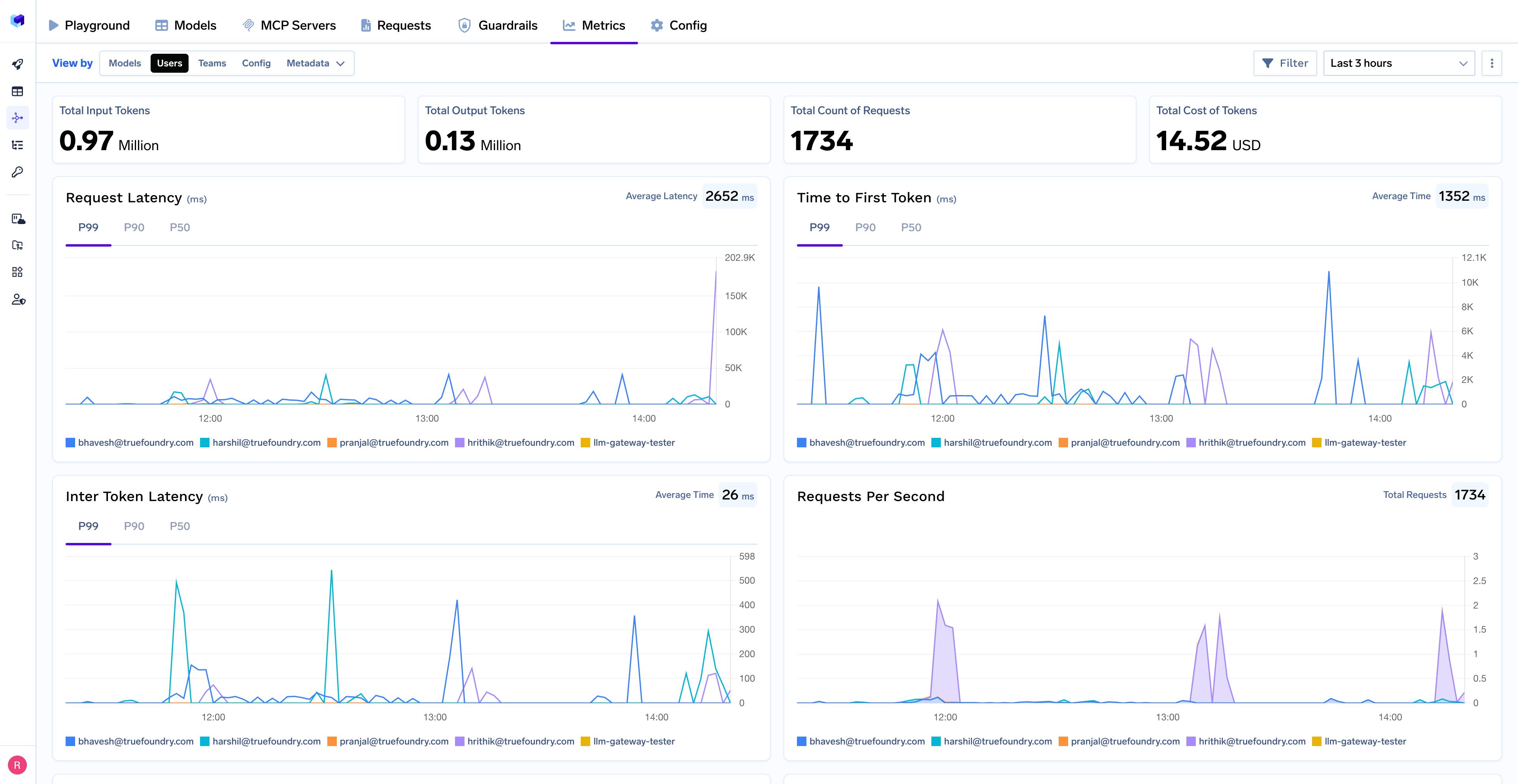
The application header tags every OpenCode request, so the dashboard can break down tokens, cost, latency and time to first token by model, user and team. The gateway also lets you set budgets and rate limits centrally, route simple requests to cheaper models, and keep logs in your own cloud account instead of a vendor's. OpenCode needs a model with at least a 128K context window to work reliably, so check that when you pick gateway models.
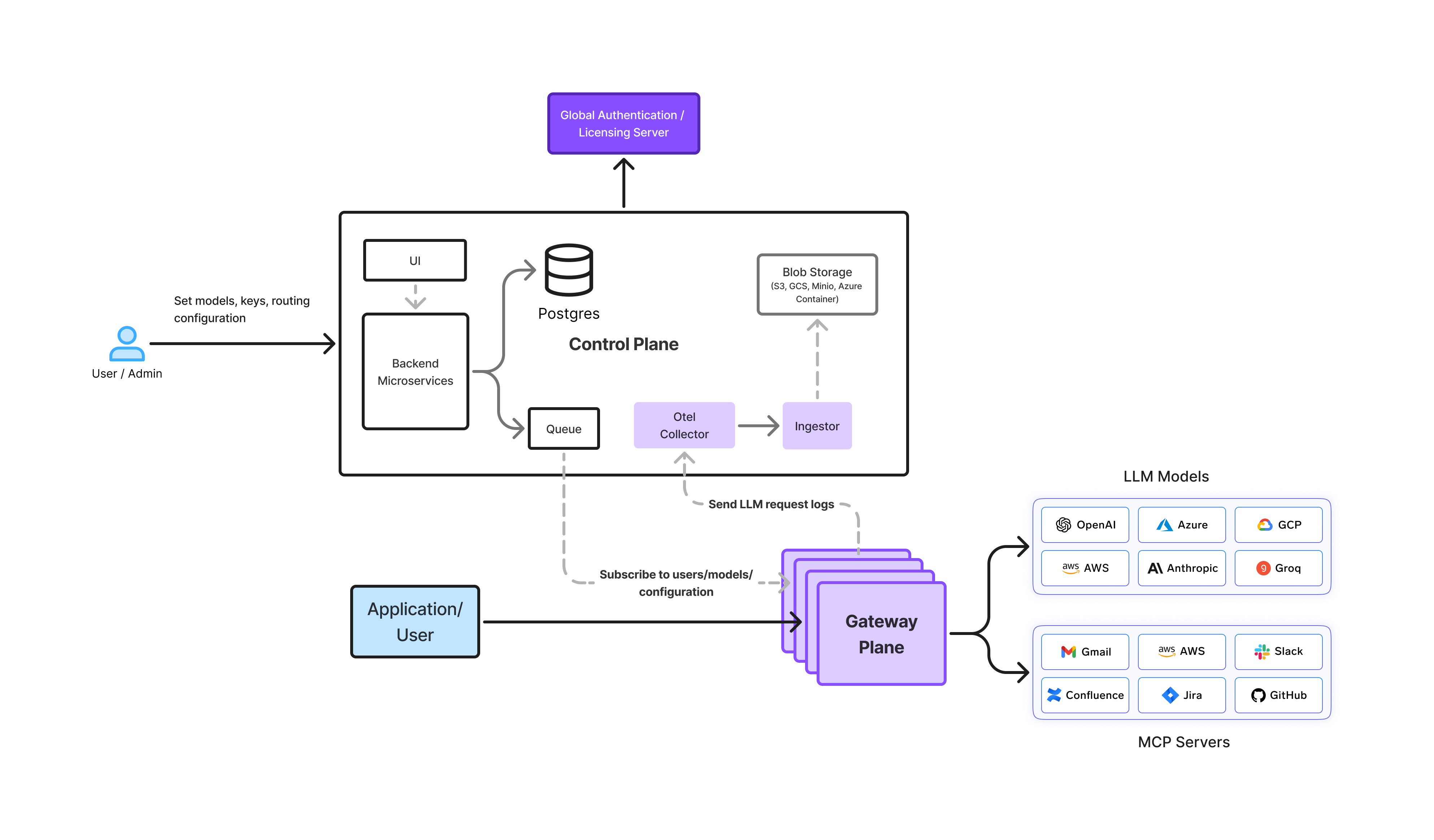
For fleet-wide control, OpenCode also reads a managed config layer that users cannot override. Teams use it to pin the gateway as the only allowed provider, and to point agents at an MCP Gateway so tool access is governed the same way. For the policy side, see our guide to coding agent governance.
OpenCode token usage is mostly a context problem. Tune compaction, prune stale output, filter noisy commands and pick the right model, and you will cut a large share of waste without changing how you work. Once more than a few people rely on it, add request-level visibility and shared limits so cost has an owner.
Run opencode stats to see session totals plus tokens and cost per model. If you use the DCP or RTK plugins, /dcp stats and rtk gain show what they saved. For per-user or per-team numbers, route OpenCode through an AI gateway that logs every request.
It is the number of tokens OpenCode sends to and receives from the model. Prompt tokens cover your instruction, files, conversation history, tool output and system prompts. Completion tokens cover what the model writes back. You pay for them per token on Zen or with your own provider key, or they count against your dollar limits on Go.
Tune compaction so long sessions get summarized earlier, prune stale tool output with Dynamic Context Pruning, filter noisy shell output with RTK, start fresh sessions for new tasks, and use cheaper models for simple work. Bound agent steps in CI so a loop cannot run unchecked.
On the Go plan, each model has a monthly dollar limit. It allows 20% of that limit in any five-hour window and 50% in a week. Requests are blocked at the limit unless you turn on Extra Usage to fall back to your pay-as-you-go balance. Zen has no fixed cap, only the spend limit you set.
Yes. A gateway adds per-user attribution, budgets, rate limits and model routing in front of OpenCode, so you can see which workflows burn tokens and stop runaway loops. It does not shrink a single prompt, so pair it with the in-tool optimizations above.
TrueFoundry AI Gateway delivers ~3–4 ms latency, handles 350+ RPS on 1 vCPU, scales horizontally with ease, and is production-ready, while LiteLLM suffers from high latency, struggles beyond moderate RPS, lacks built-in scaling, and is best for light or prototype workloads.




The latest news, articles, and resources sent to your inbox