



November 5, 2025
|
5 min read


Published: April 9, 2026

Blazingly fast way to build, track and deploy your models!
As AI teams move from experiments to production-grade agentic systems, Model Context Protocol (MCP) has emerged as a standard way to expose tools to AI agents. Teams now publish MCP servers for internal APIs, data systems, third-party services, and shared utilities- making it easier for agents to discover and invoke tools in a consistent way.
As MCP adoption increases across teams, the number of MCP servers in an organization naturally grows. Each team publishes tools close to the systems they own, which is the right architectural choice. However, this also introduces a new challenge at scale: agents often need to interact with tools spread across multiple MCP servers.
Managing multiple MCP endpoints at the agent level adds unnecessary complexity and couples agents to infrastructure details. This is where a Virtual MCP Server becomes useful. It provides a logical aggregation layer that composes tools from multiple MCP servers and exposes them through a single MCP interface to agents.
In this post, we explain what a Virtual MCP Server is, how it works in practice, and when teams should use it to simplify agent architectures as MCP usage scales.
In real-world deployments, MCP servers are rarely centralized. Different teams run MCP servers for the systems they own, such as data platforms, internal services, or operational workflows. Over time, agents need access to tools that span multiple MCP servers.
This creates three practical challenges for teams:
These challenges emerge not because MCP is insufficient, but because MCP lacks a built-in composition layer. A Virtual MCP Server fills this gap by aggregating tools across MCP servers while keeping agents isolated from infrastructure complexity.
A Virtual MCP Server is a logical MCP server that aggregates tools from multiple underlying MCP servers and exposes them as a single MCP endpoint to AI agents.
Unlike a regular MCP server, a Virtual MCP Server does not host or execute tools itself. Instead, it references tools that already exist in other MCP servers and presents them as one unified tool catalog. From an agent’s perspective, there is only one MCP server to connect to, even though the tools may be owned and operated by different teams.
In practice, this means:
When an agent invokes a tool through the Virtual MCP Server, the request is routed to the appropriate underlying MCP server that actually hosts the tool. The agent does not need to know where the tool lives or how it is managed.
This abstraction is especially useful in production environments where tool ownership is distributed across teams. Platform teams can define which tools are exposed through the Virtual MCP Server, while agent developers can focus on building behavior and workflows without embedding infrastructure details into agent logic.
At scale, a Virtual MCP Server becomes the control point that simplifies agent configuration while preserving team autonomy over tool development and operations.
A Virtual MCP Server sits between AI agents and multiple underlying MCP servers. Its role is to compose tools from those servers and expose them through a single, consistent MCP interface.
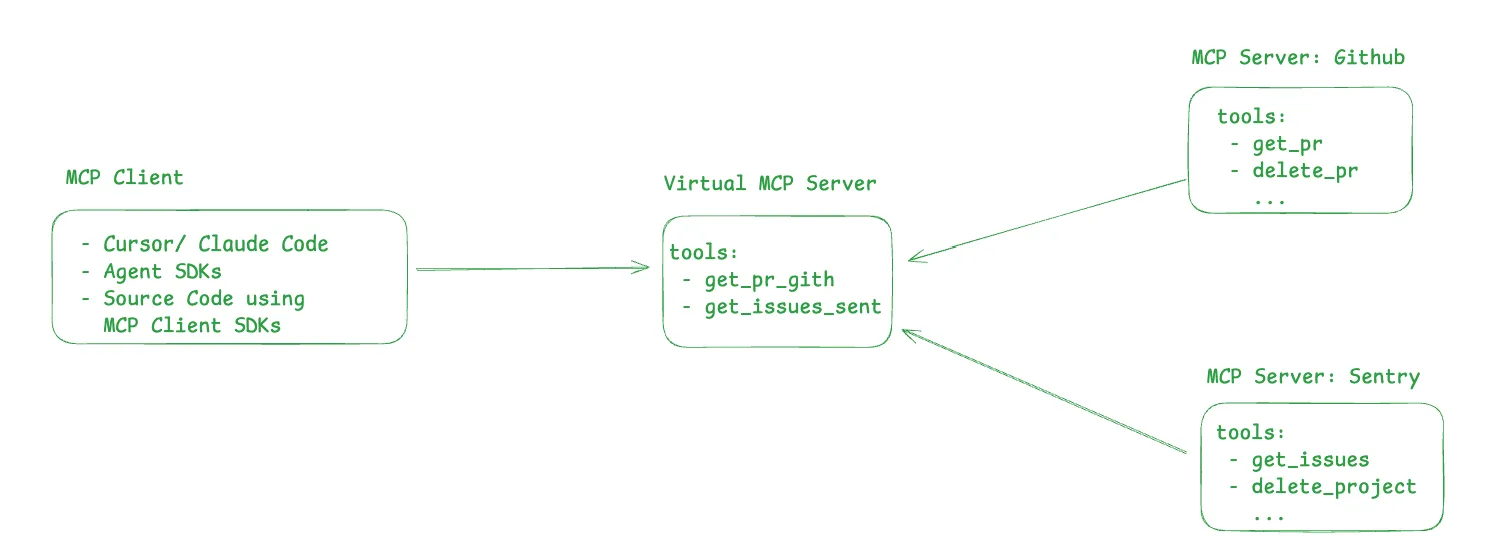
The flow typically looks like this:
This model allows agents to remain simple and stable, while teams can independently add, remove, or reorganize MCP servers behind the Virtual MCP Server without forcing changes in agent logic.
A Virtual MCP Server introduces a small but powerful abstraction that solves several practical challenges teams face when running agentic systems in production. Its capabilities focus on simplifying agent interaction while keeping tool ownership and execution decentralized.
Tool aggregation across MCP servers
A Virtual MCP Server can aggregate tools from multiple MCP servers into a single logical catalog. These MCP servers can belong to different teams, environments, or even external partners. This allows organizations to compose the exact set of tools an agent needs without relocating or duplicating tools.
Single MCP endpoint for agents
Agents connect to only one MCP endpoint instead of managing connections to multiple MCP servers. This reduces agent configuration complexity and keeps agent prompts and setup clean. As new tools are added or existing tools are moved across MCP servers, agents do not need to be updated.
Centralized governance and access control
By acting as the aggregation layer, the Virtual MCP Server becomes a natural control point. Teams can decide which tools are exposed, limit access to sensitive operations, and apply consistent policies across all tools available to agents, even when those tools live in different MCP servers.
Decoupling agents from tool infrastructure
Virtual MCP Servers remove the need for agents to understand where tools are hosted. which is one reason MCP vs RAG becomes important when designing scalable agent systems. MCP servers can be restructured, split, or merged over time without breaking agent behavior. This decoupling is critical for long term maintainability as agent systems grow.
Key Metrics for Evaluating Gateway
| Criteria | What should you evaluate ? | Priority | TrueFoundry |
|---|---|---|---|
| Latency | Adds <10ms p95 overhead for time-to-first-token? | Must Have | ✅ Supported |
| Data Residency | Keeps logs within your region (EU/US)? | Depends on use case | ✅ Supported |
| Latency-Based Routing | Automatically reroutes based on real-time latency/failures? | Must Have | ✅ Supported |
| Key Rotation & Revocation | Rotate or revoke keys without downtime? | Must Have | ✅ Supported |
| Key Rotation & Revocation | Rotate or revoke keys without downtime? | Must Have | ✅ Supported |
| Key Rotation & Revocation | Rotate or revoke keys without downtime? | Must Have | ✅ Supported |
| Key Rotation & Revocation | Rotate or revoke keys without downtime? | Must Have | ✅ Supported |
| Key Rotation & Revocation | Rotate or revoke keys without downtime? | Must Have | ✅ Supported |

While both regular MCP servers and Virtual MCP servers expose tools using the same MCP interface, they serve different roles in an agent architecture. Understanding this distinction helps teams decide when and where to introduce a Virtual MCP Server.
A regular MCP server is responsible for owning and executing tools. A Virtual MCP Server, on the other hand, focuses on composition and abstraction. It provides a single entry point for agents while delegating execution to the appropriate underlying MCP servers.
In practice, both are used together. MCP servers remain the building blocks where tools live, and Virtual MCP Servers sit above them to simplify how agents consume those tools at scale.
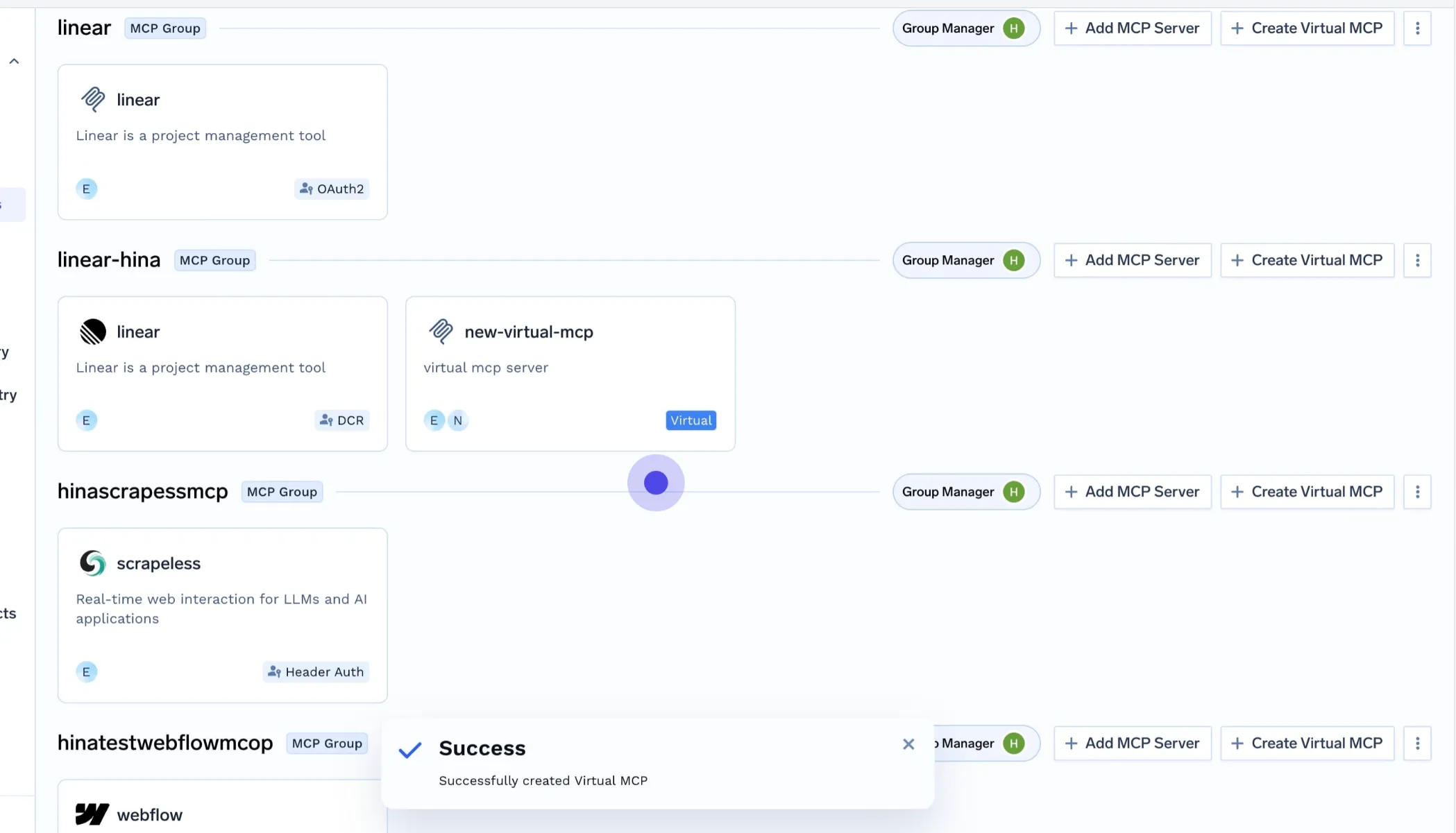
In TrueFoundry, Virtual MCP Servers are implemented as part of the AI Gateway, providing a production ready control layer for MCP based agent systems. The goal is to let teams scale MCP usage without pushing complexity into agent code.
With TrueFoundry, teams can define a Virtual MCP Server that references tools from multiple MCP servers and exposes them through a single MCP endpoint. This endpoint is what agents connect to, regardless of how many MCP servers exist behind it.
From a platform perspective, this creates a clean separation of responsibilities:
Because Virtual MCP Servers are part of the AI Gateway, routing and access control are handled centrally. When an agent invokes a tool, the gateway forwards the request to the correct underlying MCP server and returns the response transparently.
This design allows teams to:
Most importantly, it aligns with how real teams operate. Tool ownership stays decentralized, while agent access is simplified and governed through a single entry point.
A Virtual MCP Server is most useful once MCP adoption moves beyond a single team or a small set of tools. It becomes a practical necessity when agent systems start interacting with tools owned by multiple teams or exposed through different MCP servers.
You should consider using a Virtual MCP Server if:
In short, if MCP is becoming part of your core platform architecture, a Virtual MCP Server helps keep agent systems manageable as complexity increases.
Virtual MCP Servers solve a practical problem that emerges as MCP adoption scales. By aggregating tools from multiple MCP servers and exposing them through a single MCP endpoint, they simplify agent configuration while preserving decentralized tool ownership.
For teams building production grade agentic systems, this abstraction helps keep agents focused on decision making and orchestration, not infrastructure details. As MCP based ecosystems expand across teams and organizations, Virtual MCP Servers become a foundational layer for building scalable, maintainable, and interoperable agent systems.
A Virtual MCP Server is a logical aggregation layer that combines tools from multiple Model Context Protocol servers. It presents these diverse tools through a single, unified endpoint for AI agents. This simplifies agent configuration and interaction, ensuring agents can access all necessary tools without managing individual server connections, streamlining AI operations.
A virtual MCP server logically aggregates tools from multiple MCP servers. It exposes them to AI agents via a single endpoint. The server references existing tools and routes agent requests to the appropriate host server, simplifying agent configurations and ensuring seamless interaction with diverse tools.
An MCP server hosts and executes tools for AI agents. A virtual mcp server is an aggregation layer that unifies tools from many MCP servers into one endpoint. It simplifies agent access by routing requests without directly hosting any tools itself, streamlining complex AI deployments.
A virtual MCP server is essential to simplify complex AI agent architectures. It aggregates tools from multiple underlying Model Context Protocol (MCP) servers into a single, unified interface. This reduces agent configuration complexity, decouples agents from infrastructure details, and streamlines tool management for scalable AI systems.
A Virtual MCP Server solves the complexity of managing numerous Model Context Protocol (MCP) endpoints for AI agents. It aggregates tools from multiple MCP servers into a single interface, streamlining agent configuration, reducing coupling to infrastructure, and simplifying operational governance for AI teams.
TrueFoundry AI Gateway delivers ~3–4 ms latency, handles 350+ RPS on 1 vCPU, scales horizontally with ease, and is production-ready, while LiteLLM suffers from high latency, struggles beyond moderate RPS, lacks built-in scaling, and is best for light or prototype workloads.






The latest news, articles, and resources sent to your inbox


.png)



.png)
.png)
.png)

.png)
.png)
.png)
.png)
.png)
.png)
.png)


