



October 7, 2026
|
5 min read


Published: October 7, 2026

Blazingly fast way to build, track and deploy your models!
Request 51 fails.
You check the model page and it still says free. You check your balance and there is money in it. You check the docs and find a 20 requests per minute cap, which you were nowhere near, because you were making maybe three.
What you hit was the daily cap. And how high that sits depends on something no other gateway would think to tie it to: how much money you have ever given OpenRouter. Under 10 credits purchased across the lifetime of your account, free models give you 50 requests a day. At 10 or more, you get 1,000. The upgrade is permanent, so you can spend it all, drop back to a zero balance, and keep the higher ceiling.
That is the most useful thing to know about OpenRouter rate limits, and it is not the only surprise. We spent two weeks hammering the platform for a gateway evaluation. Here is what we found, including a few things the documentation does not say.
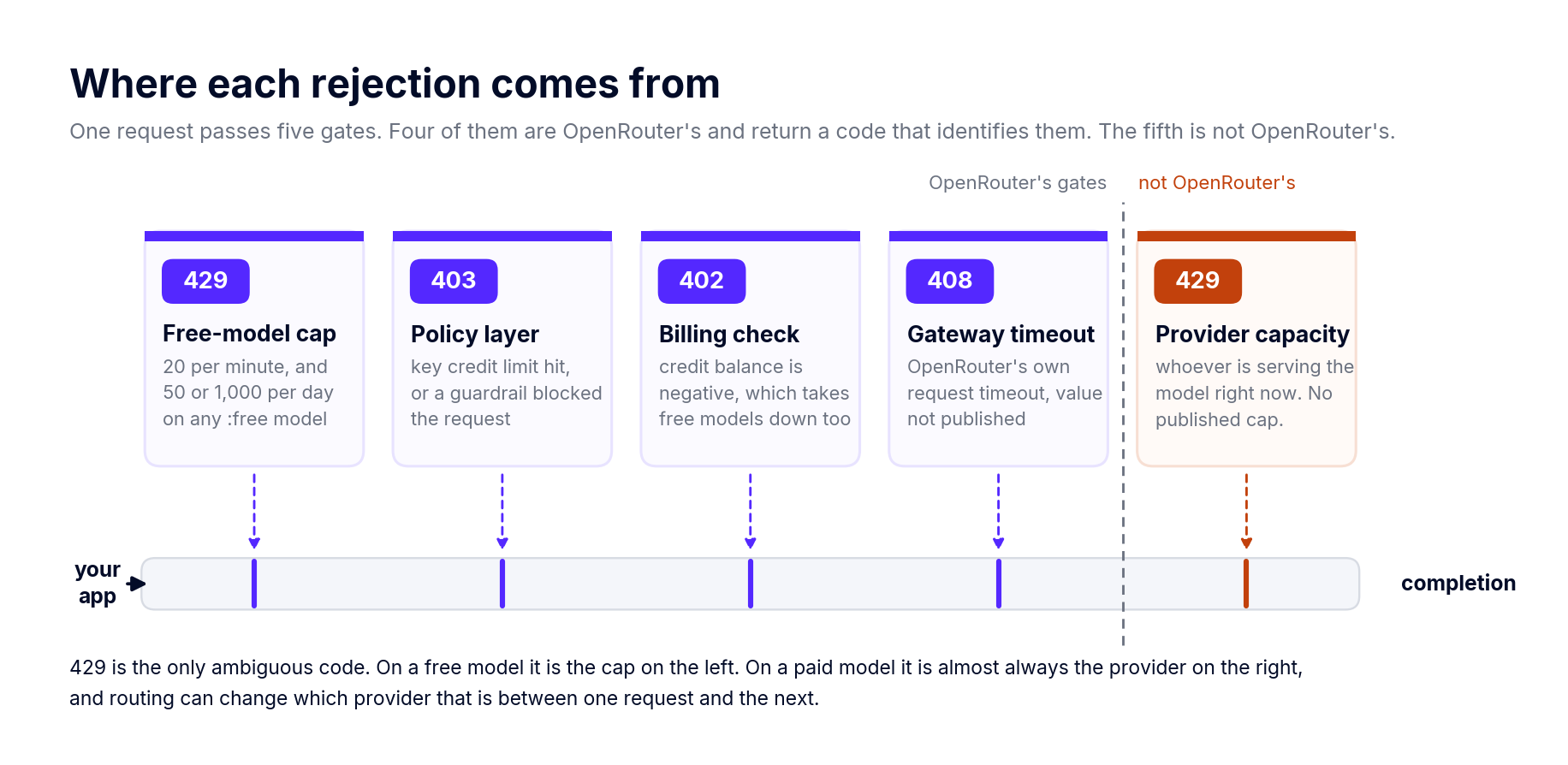
Four separate mechanisms can reject your request, and they are easy to mistake for each other.
The first is the free-model cap: 20 per minute, 50 or 1,000 per day, applied to any model ID ending in :free. That one is published and predictable. The second is the capacity of whichever provider is actually serving your paid request, which OpenRouter does not publish and cannot really control. The third is Cloudflare's DDoS protection, described in their docs only as blocking requests that dramatically exceed reasonable usage, with no number attached. The fourth is whatever budget or credit limit you configured yourself, which is not a rate limit at all but rejects traffic the same way.
Only the first of those is a rate limit in the sense you mean when you say rate limit. The rest are somebody else's capacity, a blunt safety net, and your own accounting.
The 20 per minute cap is flat. It does not move with your account status, your balance or your spend. If you need more than 20 requests a minute, free models are not the answer and no amount of money changes that.
The daily cap is the one tied to payment history, and the threshold is on lifetime purchases rather than current balance. The minimum credit purchase on OpenRouter is $5, so $10 is a deliberate second step, not the price of entry. Buying in two $5 chunks gets you to the same place as one $10 purchase, as far as we can tell.
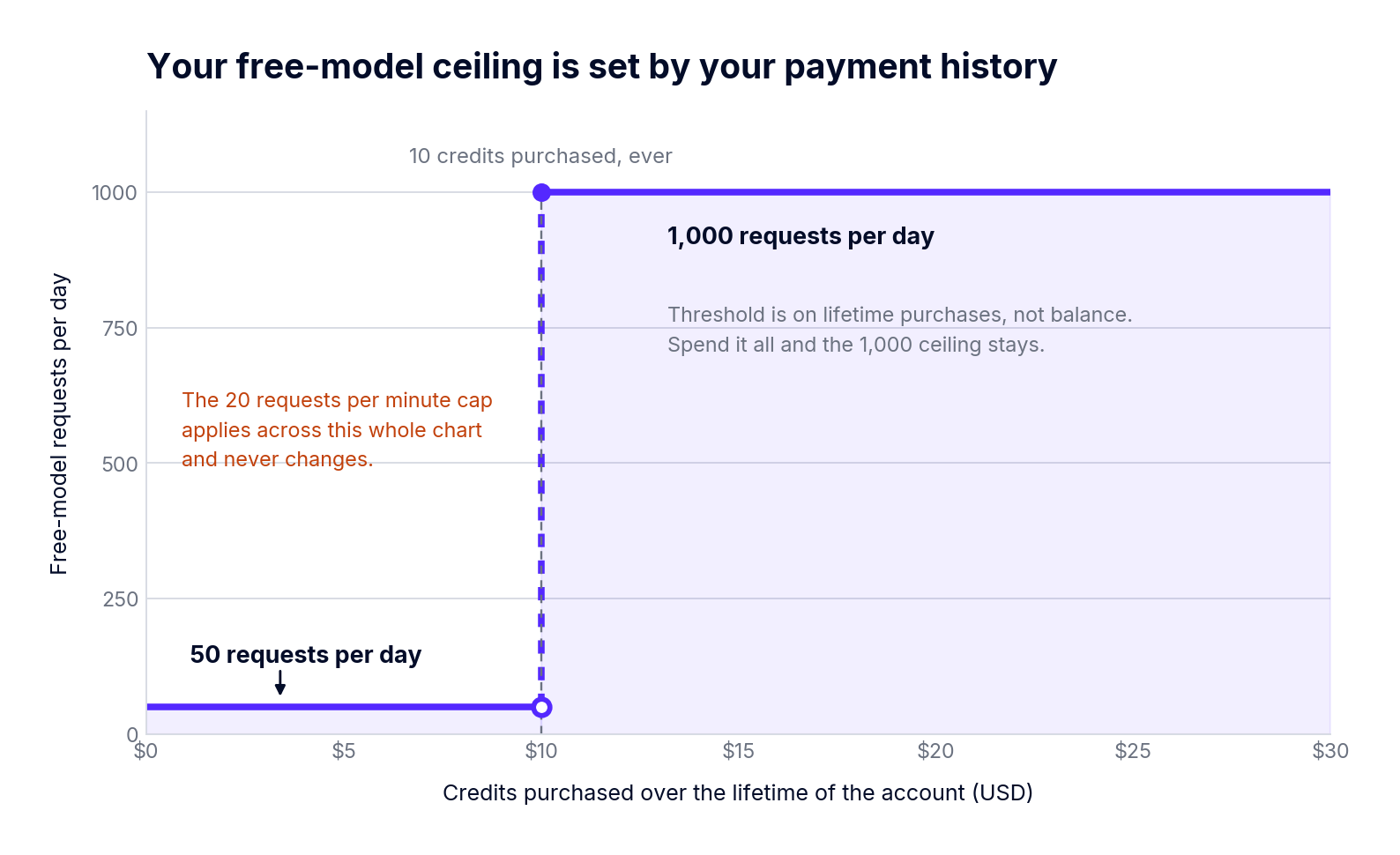
What makes this odd is the direction of causation. Your throughput ceiling is not a function of your plan or your traffic pattern. It is a function of a procurement decision, which means a finance question now answers an availability question. On a side project, fine. Once you have users, you are one accounting delay away from a capacity change.
There is a second trap underneath it: failed requests can still count against the daily allowance. A retry loop hammering a busy free model can eat your 50 requests without returning a single usable completion. If you are going to retry, cap the attempts.
Your real limits live in one API call
The dashboard will not show you a limit counter. GET /api/v1/key will, and it returns exactly what OpenRouter is enforcing on that key right now.
Two things to notice. First, is_free_tier is the payment-history mechanic again, now as a boolean your throughput logic has to read. Second, and this is the part that trips people up, the response still carries a rate_limit object that OpenRouter's own docs now mark deprecated and tell you to ignore.
Plenty of third-party guides and AI coding skills have not caught up. You will find rate limit tables quoting 20 requests per 10 seconds for unfunded accounts and 200 per 10 seconds for funded ones, all of it derived from that dead field. Those numbers do not describe anything the platform enforces today. If a dashboard, an alert rule or a client library of yours reads rate_limit, it is reading a value nobody maintains.
OpenRouter publishes no platform request cap for paid models, and we went looking for one. A concurrency sweep on credit-billed traffic at 1, 4, 8 and 16 requests in flight produced zero rejections at every level. No 429s, no shedding, no queuing. Median time to first token barely moved between one in flight and sixteen.
We did not find the ceiling. The sweep stopped at 16 and ran against OpenAI-served models, so take that as a floor rather than a figure: the gateway did not throttle us below 16 concurrent, and where it starts is still an open question.
Which means a 429 on a paid model is usually not OpenRouter asking you to slow down. It is the provider currently serving that model string. And since routing can move you between hosts without the model string changing, the capacity you are working against can change between one request and the next. You can make it predictable by pinning with provider.order or provider.only, at the cost of the failover you presumably adopted a router to get.
Nothing in OpenRouter's docs collects these in one place, and the code is the fastest way to tell which layer just rejected you.
The 402 catches people out, because it means "free" is conditional on not being overdrawn. Go negative and the free models stop working too.
Keep 403 out of your retry path entirely. Retrying it achieves nothing, since the thing blocking you is a policy rather than a queue. We hit an exhausted key limit during testing and got back a clean 403 reading "Key limit exceeded (total limit)" with a link straight to that key's settings page. Credit where it is due: OpenRouter's errors for its own decisions are excellent. Errors relayed from providers are whatever the provider felt like saying, and both arrive under the same top-level message, so the status code is your only reliable signal of which world you are in.
This is the part that cost us the most time. Retries, backoff and jitter are not configurable. We sent max_retries and a structured retry policy object, and both came back HTTP 200 with no error, which means accepted and ignored rather than honoured. Same story with timeout.
The cause is a validation gap. OpenRouter checks keys inside the provider object against a known list and rejects unknown ones properly. Top-level keys are not checked. So an unsupported top-level directive earns you a successful response and no hint that it did nothing, which is a worse failure than a 400 would have been.
There is no stream-idle timeout either, on the server or as a client parameter. Across roughly 4,300 requests we had two streams end early with no HTTP error at all. Rare, but your client has to notice, because nothing else will tell you.
All of which puts pacing, retries and timeouts in your application. OpenRouter's engineering blog says as much, and we would rather they said it than pretended otherwise. It does mean that if you run several services, you are writing this logic several times.
Teams collapse these into one idea and then wonder why neither fired when expected. Rate limits protect capacity inside a time window. Budgets protect money across a period. On OpenRouter they are separate features that return different status codes.
Key credit limits reset daily, weekly or monthly at midnight UTC, with weeks running Monday to Sunday. Leave the reset unset and you have a lifetime cap. The anchor is not configurable, so if your fiscal month starts on the 25th, or your team works in IST, your resets will not line up with your reporting.
Guardrail budgets nest across lifetime, monthly, weekly and daily windows, and the limits have to strictly decrease as the window narrows. They also do not pool, which surprises people: give three engineers the same daily budget guardrail and each one gets that budget separately, while a single request counts against both the key's budget and the budget of whoever owns the key. BYOK spend stays invisible to budgets unless include_byok_in_budgets is switched on, which is a defensible default for billing and a poor one for governance.
Enforcement is a hard stop rather than a warning. No warn-only mode is documented, so the first sign that a budget exists is traffic failing. The fee side of all this sits outside this post, but our OpenRouter pricing breakdown covers the 5.5% credit purchase fee and the BYOK allowance in detail.
The daily free cap counts requests, not tokens. A 100,000 token conversation and a two word prompt cost you exactly the same: one. That sounds generous right up until you run a tool loop, where one task might make twenty calls and the request ceiling binds long before anything token shaped does.
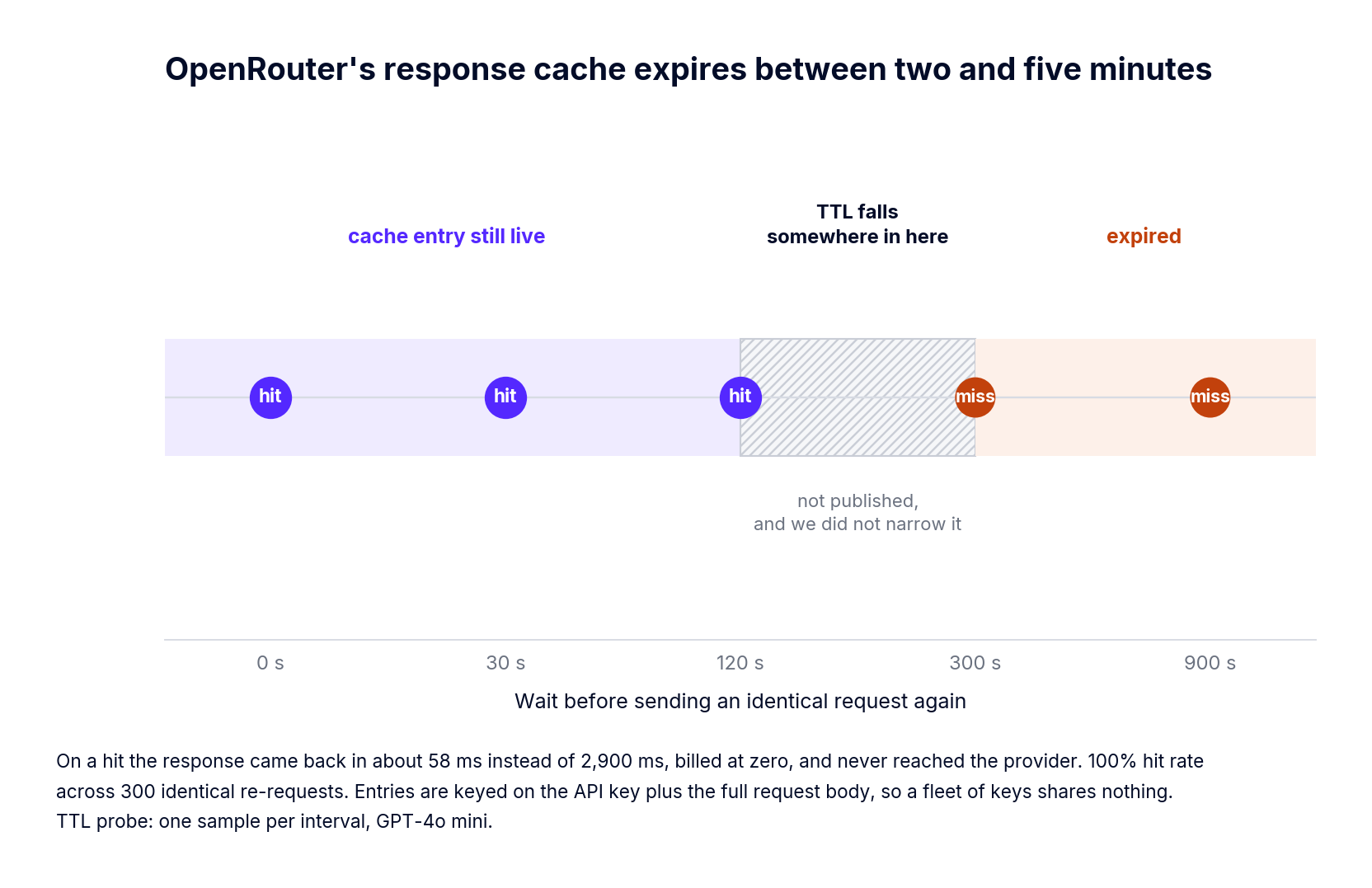
Response caching helps, narrowly. Opt in per request with the X-OpenRouter-Cache: true header and an identical re-request comes back in about 58 ms instead of 2,900 ms, billed at zero, and the hit does not consume provider rate limit because the request never reaches the provider. We measured a 100% hit rate across 300 identical re-requests. The constraints are where it gets interesting: entries are keyed on your API key plus the entire request body, so a fleet of services each holding its own key shares nothing, and the measured TTL sits somewhere between two and five minutes. Still present at 120 seconds, gone by 300. OpenRouter does not publish that number. It covers retry storms and double submissions inside a session, and not a query that comes back every hour.
One more ceiling that bites during evaluation rather than production: an organization account caps at 10 members, raisable by contacting support. Trialling across a platform team of fifty starts with a support ticket.
Our gateway takes a different position on two things: which unit you count, and whether capacity and money are the same control.
We rate limit on six units, requests_per_minute, requests_per_hour, requests_per_day, and the same three for tokens. Requests per minute is a weak proxy for load when one call might be 200 tokens or 200,000, so a counter permitting 1,000 requests cannot tell you whether you are about to spend a dollar or four figures. Token units can. Rules are scoped with rate_limit_applies_per, so a limit applies per user, per team or per model rather than being stuck to a key, and we allow a maximum of two values per rule to keep the behaviour predictable.
The window shape matters more for agents than for humans, so we use a sliding window 60 seconds wide in 10 second buckets, summing the last six. A burst straddling the end of one fixed minute and the start of the next cannot sneak through at double the limit. Our guide to token based rate limiting and budgets walks through the configuration.
Budgets stay separate, cost only, in USD, enforced before inference runs instead of discovered on an invoice. The gateway adds roughly 3 to 4 ms of overhead and handles 350+ RPS on a single vCPU, so evaluating these rules does not cost you anything you would notice.
And switching gateways is not the only move available, which we would rather say out loud. TrueFoundry supports OpenRouter as a provider, so you can keep its catalog and its failover while putting token aware limits, per team budgets and user attributed logging in front of it. For a lot of teams that is the right first step. If you are further down the road and the constraints above are why you are reading this, our writeup on OpenRouter alternatives compares the options for production use.
OpenRouter rate limits are easy to state and awkward to build against. The published numbers only cover free models. The paid ceiling belongs to a provider you did not pick. Retries and timeouts land in your code whether you planned for that or not. And your free throughput is a function of your payment history, which is a strange sentence to have to write.
That is a reasonable trade for getting a few hundred models behind one key, and most teams make it happily. It just helps to know where the edges are before an agent loop finds them for you.
If you want limits counted in tokens, budgets kept separate from capacity, and both enforced inside your own infrastructure, see how the TrueFoundry AI Gateway handles rate limiting.
TrueFoundry AI Gateway delivers ~3–4 ms latency, handles 350+ RPS on 1 vCPU, scales horizontally with ease, and is production-ready, while LiteLLM suffers from high latency, struggles beyond moderate RPS, lacks built-in scaling, and is best for light or prototype workloads.






The latest news, articles, and resources sent to your inbox

.png)


.png)
.png)
.png)

.png)
.png)
.png)
.png)
.png)
.png)


