



October 10, 2026
|
5 min de lecture


Accédez instantanément à un environnement TrueFoundry en direct. Déployez des modèles, acheminez le trafic LLM et explorez la plateforme complète : votre sandbox est prête en quelques secondes, aucune carte de crédit n'est requise.



Published: October 6, 2026
.webp)
Une méthode incroyablement rapide pour créer, suivre et déployer vos modèles !
AI agent guardrails are content-inspection controls that examine the actual payload of every agent interaction — the user prompt, the model's response, and the arguments and results of each tool call — and take action (allow, block, or rewrite) based on policy.
It helps to separate two questions every governed agent call has to answer:
Access control is the bouncer at the door; guardrails are the metal detector. You need both. An agent can be fully authorized to call your Postgres MCP server and still be tricked into sending a destructive query — access said yes, and only a guardrail on the tool arguments catches what the query actually is.
Guardrails aren't new to LLM apps, but agents change the problem in three concrete ways:
On TrueFoundry, guardrails are enforced at the gateway on the agentic call path — the chain of user → app → agent → sub-agent → MCP tool calls. Every governed hop passes an interception point with a before and after hook.
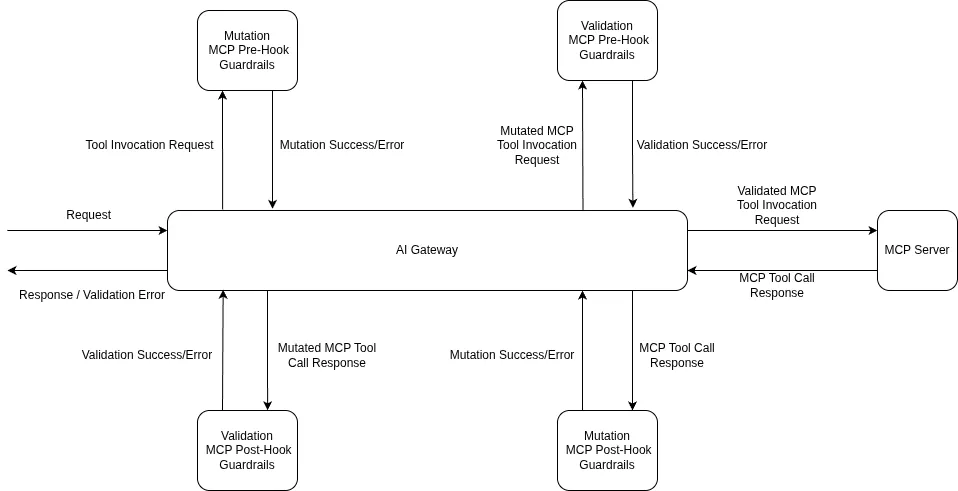
The ordering matters for cost and blast radius. A pre-tool failure means the tool never executes — the cheapest possible failure. An LLM input failure cancels the in-flight model request before you pay for it. Because every hop is checked independently, a compromised tool result on hop three is caught on hop three, not after it has already fanned out into three more calls.
The value of running guardrails at the MCP Gateway is that each real agent risk maps to a specific, built-in control. TrueFoundry's built-in guardrails run on TrueFoundry-managed infrastructure — no third-party API keys to provision.
Beyond the built-ins, the gateway plugs into external providers — Palo Alto Prisma AIRS, CrowdStrike AIDR, Cisco AI Defense, AWS Bedrock Guardrails, Google Model Armor, NVIDIA NeMo Guardrails, Guardrails AI, and more — and supports fully custom guardrails when you need logic specific to your domain.
The prompt-injection guardrail is the one built specifically for the agent problem: it analyzes the user prompt and any document or context content separately, so an injection hidden inside a returned web page or ticket is caught even when the user's own message is clean.
Applying guardrails to agent traffic is a three-step flow, and crucially none of it lives in your agent code.
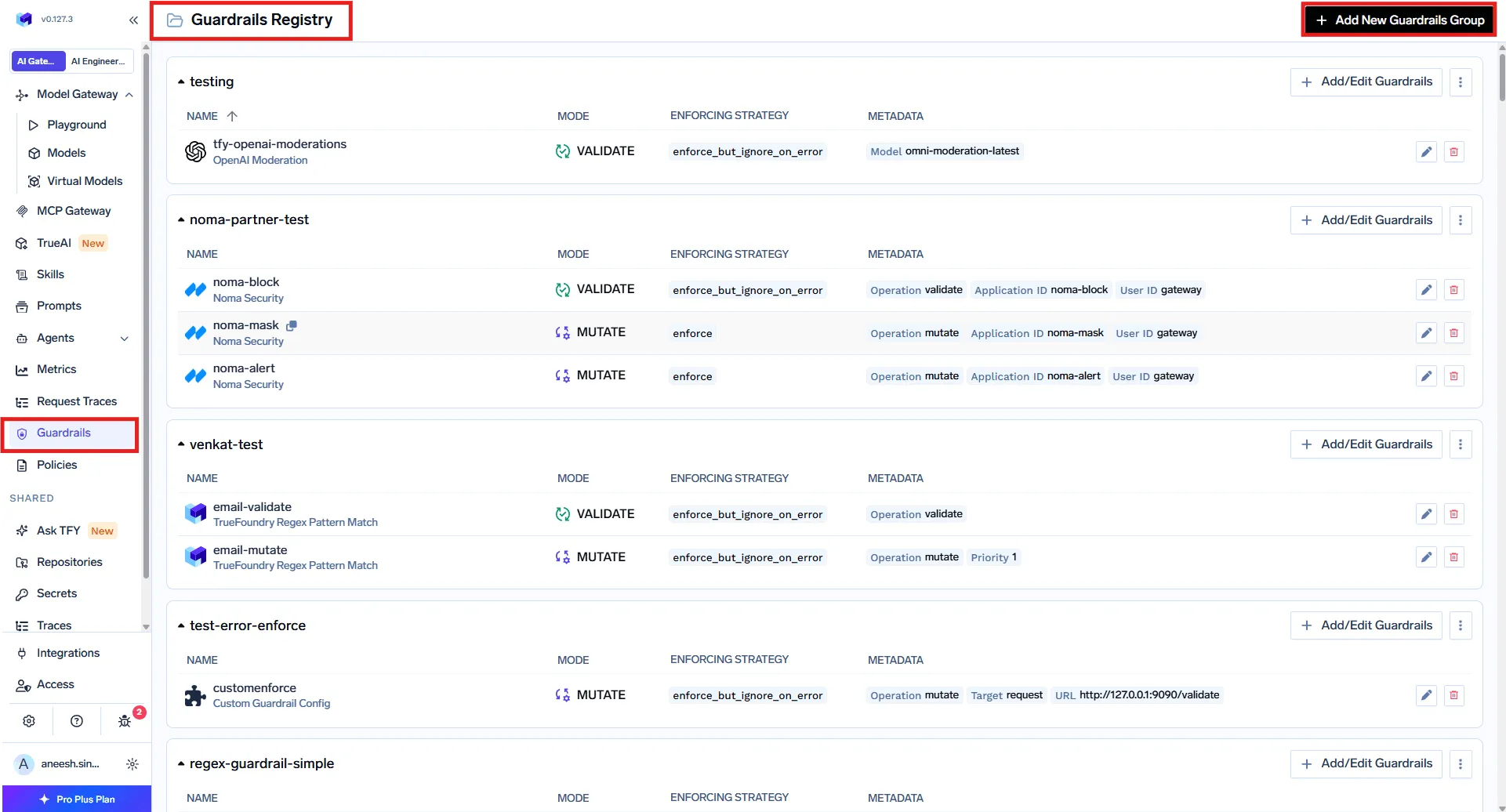
In AI Gateway → Guardrails, create a guardrails group and add the integrations you need — built-in, external provider, or custom. A group is also the unit of access control: a Manager can add, edit, and delete guardrails; a User can only apply them. A common pattern is one org-wide group owned by the platform team, plus per-team groups for product-specific checks.
In AI Gateway → Policies → Guardrails, create rules that decide when each guardrail runs. This is what makes the model scale to fleets of agents: rules are keyed on the target (the models, MCP servers, and even specific tools being called) and the subject (users, teams, or virtual accounts). Because a rule covers every caller of a given MCP server or model, it protects every agent that touches that target — with no per-agent setup.
Each rule combines:
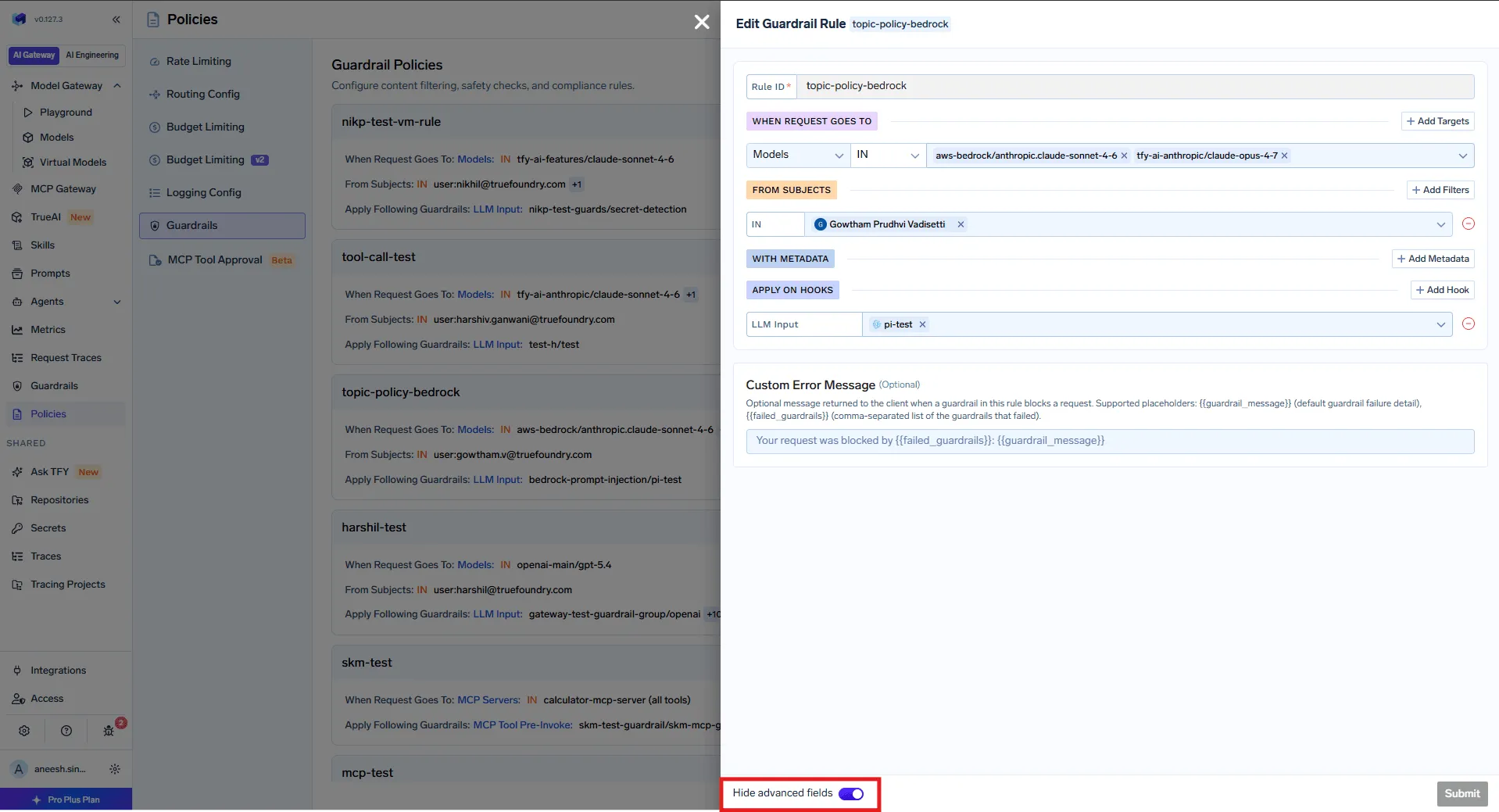
Product screenshot — TrueFoundry docs: guardrail policy rule editor.
All matching rules are evaluated and their guardrails are merged per hook. If Rule A applies PII detection on LLM Input and Rule B applies prompt-injection detection on LLM Input, both run. A rule with no target or subject conditions becomes a baseline that applies to all traffic — useful for a company-wide prompt-injection check on top of everything else.
For quick tests or one-off calls, you can also pass guardrails per request with the X-TFY-GUARDRAILS header, which bypasses policies entirely:
curl https://<your-gateway>/api/llm/chat/completions \
-H "Authorization: Bearer $TFY_API_KEY" \
-H 'X-TFY-METADATA: {"environment":"production","agent":"research-agent"}' \
-H 'X-TFY-GUARDRAILS: {"llm_input":["global/prompt-injection","global/pii-detection"]}' \
-H "Content-Type: application/json" \
-d '{
"model": "openai-main/gpt-4o",
"messages": [{"role":"user","content":"Summarize ticket #4521 and email the customer"}]
}'
Every request is traced with the guardrails that ran and their verdicts, so you can confirm coverage before you trust it. This is also where you tune false positives, which matter more for agents than for chatbots: a blocked hop can fail an entire chain.
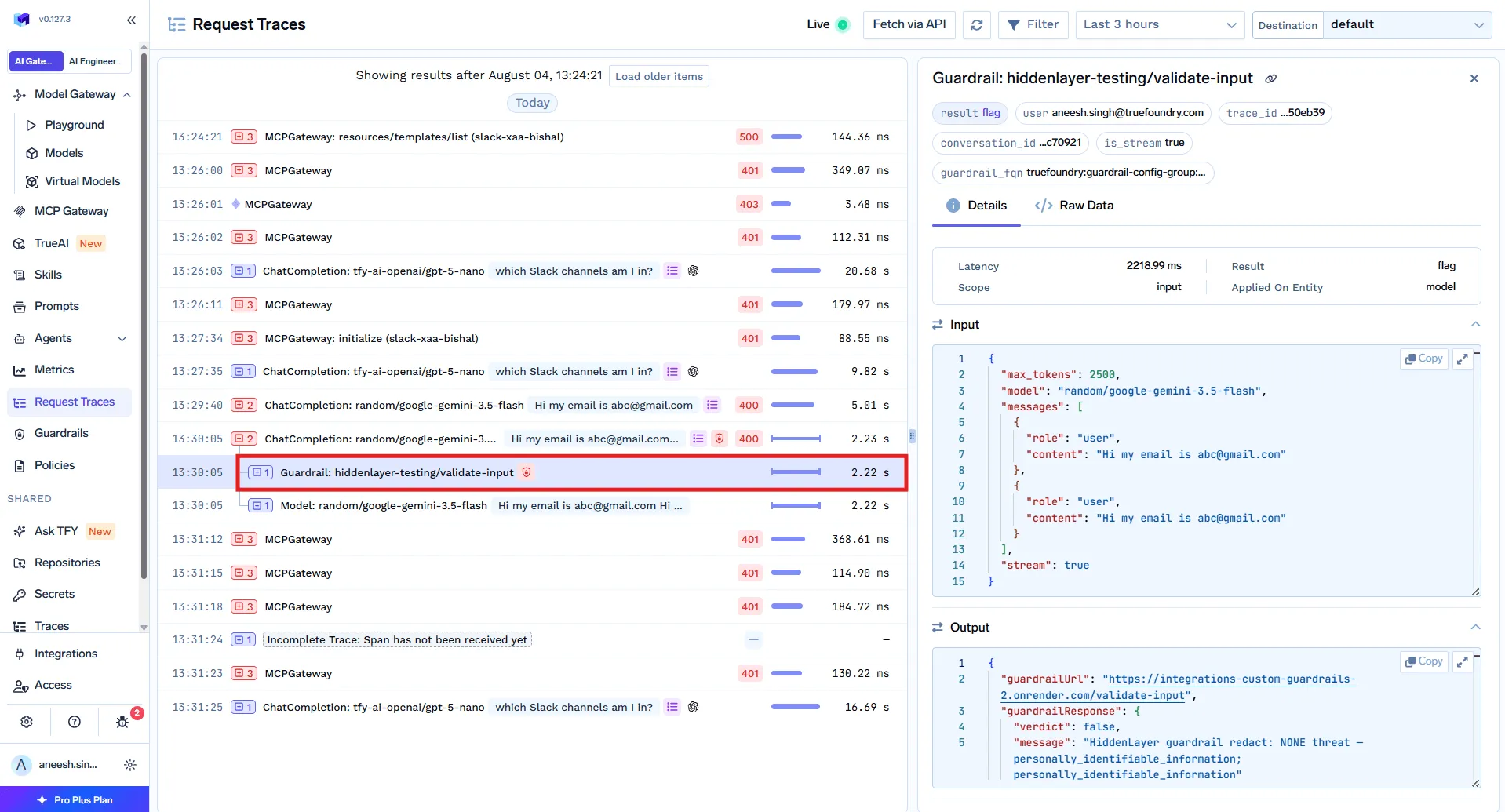
Product screenshot — TrueFoundry docs: guardrail results in a request trace.
Before shipping, use the Playground to fire test prompts and tool calls against all four hooks and watch what gets caught.
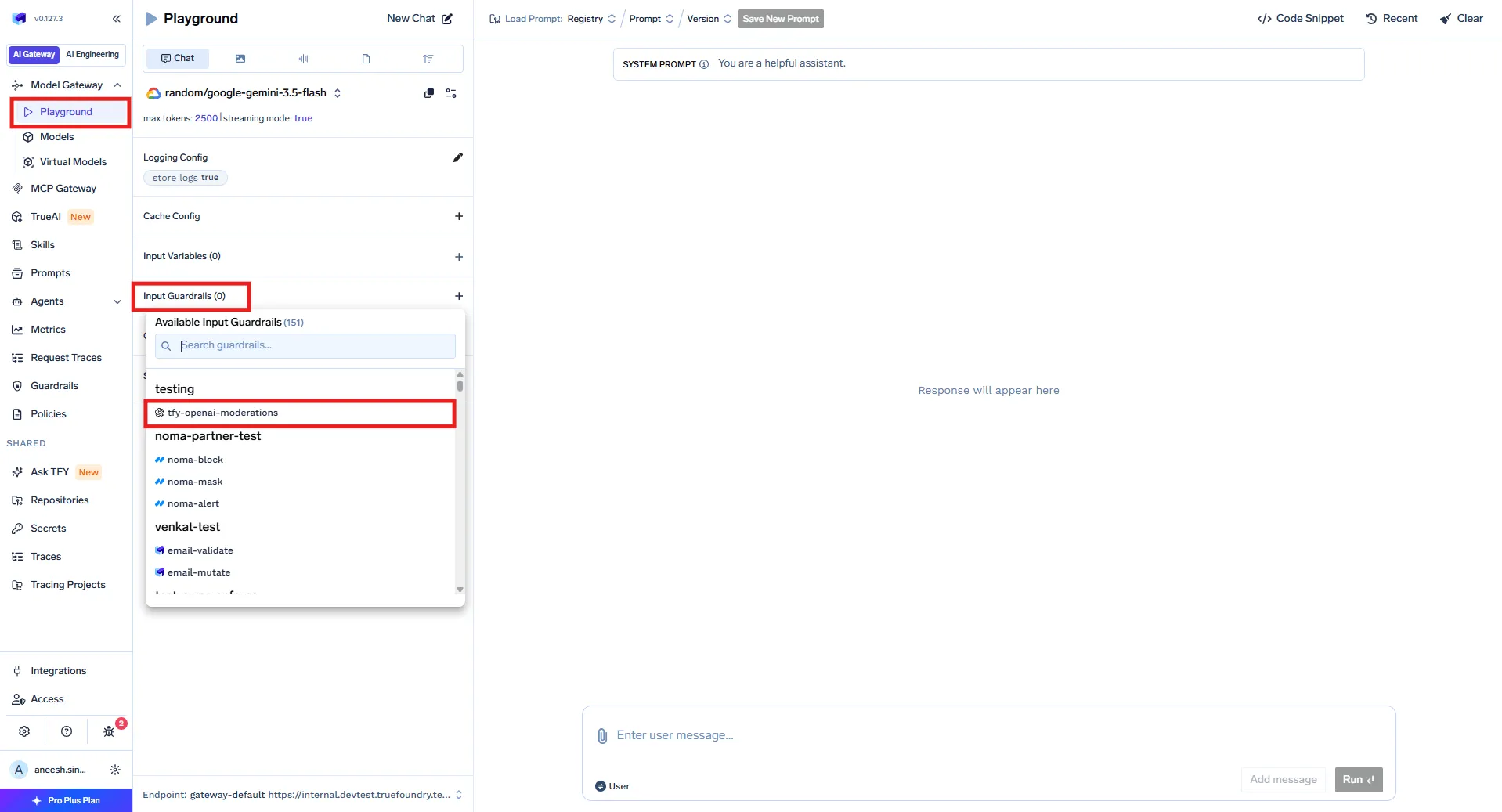
Product screenshot — TrueFoundry docs: AI Gateway Playground.
Two settings control how each guardrail behaves.
Operation mode:
Enforcement strategy:
For custom logic, you deploy a guardrail as an HTTP service and the gateway reads its response contract: an HTTP 2xx means the guardrail ran, and the JSON body carries the outcome — verdict: false to deny, or a mutated result body to rewrite:
TrueFoundry AI Gateway offre une latence d'environ 3 à 4 ms, gère plus de 350 RPS sur 1 processeur virtuel, évolue horizontalement facilement et est prête pour la production, tandis que LiteLM souffre d'une latence élevée, peine à dépasser un RPS modéré, ne dispose pas d'une mise à l'échelle intégrée et convient parfaitement aux charges de travail légères ou aux prototypes.





Les dernières nouvelles, articles et ressources envoyés dans votre boîte de réception
.webp)


.png)
.png)
.png)
.png)
.png)






.png)




