



October 10, 2026
|
5 min de lecture


Accédez instantanément à un environnement TrueFoundry en direct. Déployez des modèles, acheminez le trafic LLM et explorez la plateforme complète : votre sandbox est prête en quelques secondes, aucune carte de crédit n'est requise.



Published: October 6, 2026
.webp)
Une méthode incroyablement rapide pour créer, suivre et déployer vos modèles !
Claude Skills, sometimes called agent skills, are reusable capability bundles that teach an agent how to perform a specialized task, such as querying a database, triaging an alert, following an escalation playbook, or drafting release notes. A skill is authored once and reused everywhere, so the same procedure powers a production agent, a local Claude Code session, or Cursor without being rewritten for each one.
The key idea is that a skill is not a prompt you paste in. It is a small, self-contained package the agent reads on demand when the task calls for it.
Every skill is a directory rooted at a SKILL.md file. That file has two parts:
A skill can also bundle supporting files next to SKILL.md, such as reference documents and scripts, which the model reads on demand once the skill is in scope. A typical multi-asset skill looks like this:
---
name: analytics-helper
description: How to query the analytics warehouse. Use when the user asks for sales, usage, or cost numbers.
---
# Analytics Helper Skill
## Querying Tables
1. Use the `query.py` script in this skill's `scripts/` directory.
2. Look up schemas in `references/sales-tables.md`.
3. Cap results at 1000 rows unless the user asks for a full export.
## Common Aggregations
For revenue, group by `month_start` and sum `gross_revenue`.
When a user asks "how much revenue did we make in October," the agent reads the skill, follows the steps, and uses the bundled scripts and references to answer, rather than guessing the schema.
Writing your first skill takes minutes. Running a library of them across a company is where teams hit friction, and it usually shows up as the same set of problems.
Skill files end up scattered across repositories, so nobody knows which skills exist or which is the canonical version. There is no version pinning independent of code, so a change to a skill can silently alter an agent's behavior in production. There is no access control per skill, so any team can read or change any procedure. And the same skill gets copied into three repos and slowly drifts out of sync.
These are governance problems, not authoring problems, and they are exactly what a central registry is for.
In TrueFoundry, skills live in the Skills Registry, a centralized, versioned, RBAC-governed catalog. That is a deliberate contrast with the default experience, where skill files are committed to agent repos or uploaded ad hoc with no shared registry, no version pinning, and no per-skill access control.
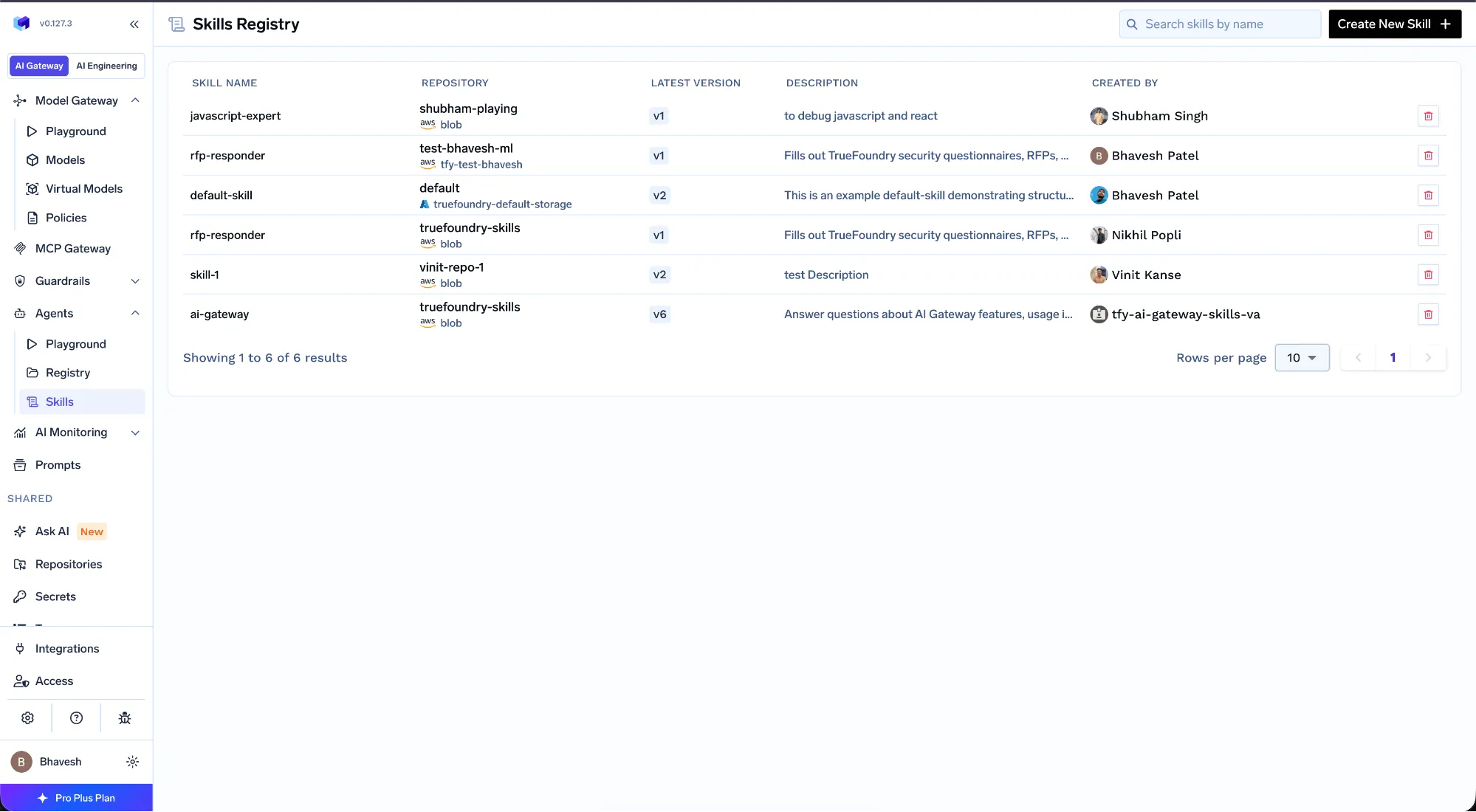
Product screenshot, TrueFoundry docs: the Skills Registry.
The registry adds the controls a growing skill library needs:
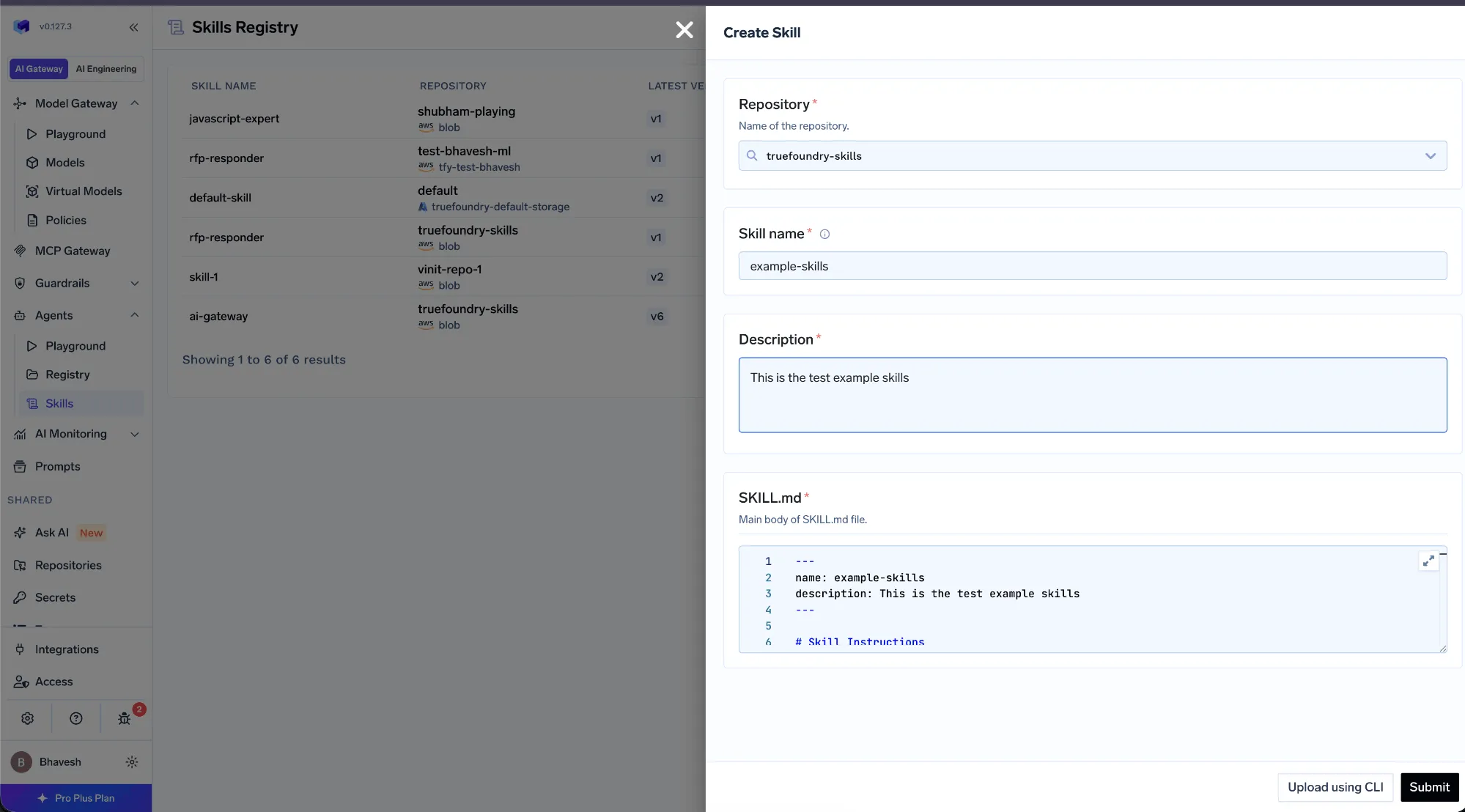
Product screenshot, TrueFoundry docs: publishing a skill version.
Because the registry sits alongside the AI Gateway and MCP Gateway, a skill is not an isolated file. Platform teams govern which skills are available to which agents and teams, and agent builders pick from an approved catalog rather than managing files by hand. The skill a developer uses in Claude Code is the same governed artifact a production agent uses, which is what keeps behavior consistent as you scale.
TrueFoundry AI Gateway offre une latence d'environ 3 à 4 ms, gère plus de 350 RPS sur 1 processeur virtuel, évolue horizontalement facilement et est prête pour la production, tandis que LiteLM souffre d'une latence élevée, peine à dépasser un RPS modéré, ne dispose pas d'une mise à l'échelle intégrée et convient parfaitement aux charges de travail légères ou aux prototypes.




Claude Skills are reusable bundles of instructions, packaged as a SKILL.md file with a name, a description, and a procedure, that teach an agent how to perform a specific task. The same skill can run in Claude Code, Cursor, or a production agent, so a known-good procedure is reused everywhere instead of being re-derived each time.
You create a directory with a SKILL.md file. The frontmatter holds a name and an action-oriented description that tells the model when to use the skill, and the Markdown body holds the steps. You can add reference files and scripts alongside it, and the agent reads those on demand once the skill is in scope.
A skill provides instructions, the procedure an agent should follow, while MCP provides a connection to tools and data the agent can call. They are complementary: the skill says how to do the task, and MCP gives the agent the tools to do it. TrueFoundry governs both from one place.
Store them in a central, versioned registry rather than scattering files across repos. TrueFoundry's Skills Registry lets you pin versions, apply RBAC per skill, and reuse the same skill across many agents and surfaces like Claude Code and Cursor without duplication or drift.
Yes. In TrueFoundry, skills inherit RBAC from their parent repository, so you decide who can read, use, or publish each skill, and every version change and use is logged for audit.
Yes. TrueFoundry runs in your VPC, on-prem, air-gapped, or hybrid, so your skills, prompts, and agent traffic stay inside your own domain.



Les dernières nouvelles, articles et ressources envoyés dans votre boîte de réception
.webp)


.png)
.png)
.png)
.png)
.png)






.png)




